;%20}%20.cls-2%20{%20fill:%20url(%23linear-gradient);%20}%20.cls-3%20{%20fill:%20%23fff;%20}%20%3c/style%3e%3clinearGradient%20id='linear-gradient'%20x1='332.78'%20y1='1098.21'%20x2='691.22'%20y2='-74.21'%20gradientUnits='userSpaceOnUse'%3e%3cstop%20offset='0'%20stop-color='%23c1826a'/%3e%3cstop%20offset='1'%20stop-color='%23a64218'/%3e%3c/linearGradient%3e%3clinearGradient%20id='linear-gradient-2'%20x1='332.78'%20y1='1098.21'%20x2='691.22'%20y2='-74.21'%20gradientUnits='userSpaceOnUse'%3e%3cstop%20offset='0'%20stop-color='%23a64218'/%3e%3cstop%20offset='1'%20stop-color='%23c1826a'/%3e%3c/linearGradient%3e%3c/defs%3e%3cg%20id='background'%3e%3cg%3e%3crect%20class='cls-2'%20width='1024'%20height='1024'%20rx='106'%20ry='106'/%3e%3cpath%20class='cls-1'%20d='M918,45c33.64,0,61,27.36,61,61v812c0,33.64-27.36,61-61,61H106c-33.64,0-61-27.36-61-61V106c0-33.64,27.36-61,61-61h812M918,0H106C47.46,0,0,47.46,0,106v812c0,58.54,47.46,106,106,106h812c58.54,0,106-47.46,106-106V106c0-58.54-47.46-106-106-106h0Z'/%3e%3c/g%3e%3c/g%3e%3cg%20id='logo'%3e%3cg%3e%3cpath%20class='cls-3'%20d='M472.63,347.61c3.55,3.47,7.75,6.63,9.95,11.41-16.91,25.42-29.7,54.57-38.13,83.93-1.7.37-1.9-.49-2.72-1.59-4.23-5.62-7.54-14.22-12.2-20.41-39.88-52.93-120.34-59.99-157.19.02-37.61,61.24-39.17,152.05-20.43,219.82,28.21,102,100.3,177.42,203.16,205.2,119.44,32.26,255.45-33.37,312.23-137.27,8.03-14.69,12.99-31.88,20.58-45.61,23.24-42.08,81.55-18.47,72.44,37.9-21.62,133.82-251.04,244.21-391.97,221.67-143.77-23-279.41-145.18-304.69-305.87-17.34-110.26,4.7-225.5,97.67-295.1,61.25-45.85,159.27-24.96,211.31,25.91Z'/%3e%3cpath%20class='cls-3'%20d='M446.59,687.32c-5.64,4.93-42.89,22.43-50.87,23.96-19.3,3.7-38.46,5.02-58.09,3.82-7.65-9-14.99-21.3-20.71-31.41-9.4-16.35-16.41-31.88-21.26-50.44,0,0,55.72,2.63,91.44-7.24h0c69.95-32.12,88.71-165.24,124.01-229.12,60.26-109.07,204.41-136.1,295.35-48.28,24.08,23.25,63.1,82.44,59.04,116.79-3.84,32.52-45.86,46.69-69.44,24.56-11.35-10.65-11.89-24.63-17.29-38.35-22.96-58.24-80.93-89.15-141.47-65.71-62.23,24.1-73.72,101.14-92.63,156.8-17.89,52.65-54.78,108.58-98.07,144.64h0Z'/%3e%3cpath%20class='cls-3'%20d='M736.71,245c-43.98,42.44-118.63,24.64-138.79-32.74-25.04-71.25,47.83-137.82,116.45-104.93,53.62,25.7,65.37,96.15,22.34,137.67Z'/%3e%3cpath%20class='cls-3'%20d='M334.89,98.84c53.87-5.54,100.75,42.2,93.13,96.01-10.25,72.35-100.34,99.44-148.55,43.27-44.45-51.8-12.02-132.34,55.42-139.28Z'/%3e%3c/g%3e%3c/g%3e%3c/svg%3e)
What you’ll receive
Two categories of messages, both transactional:
- One-time verification codes. A 6-digit code sent when you add or verify a phone number on your PeopleCount account.
- Account notifications. Operational alerts about your PeopleCount account or workspace.
We do not send marketing or promotional messages on this number.
How you opt in
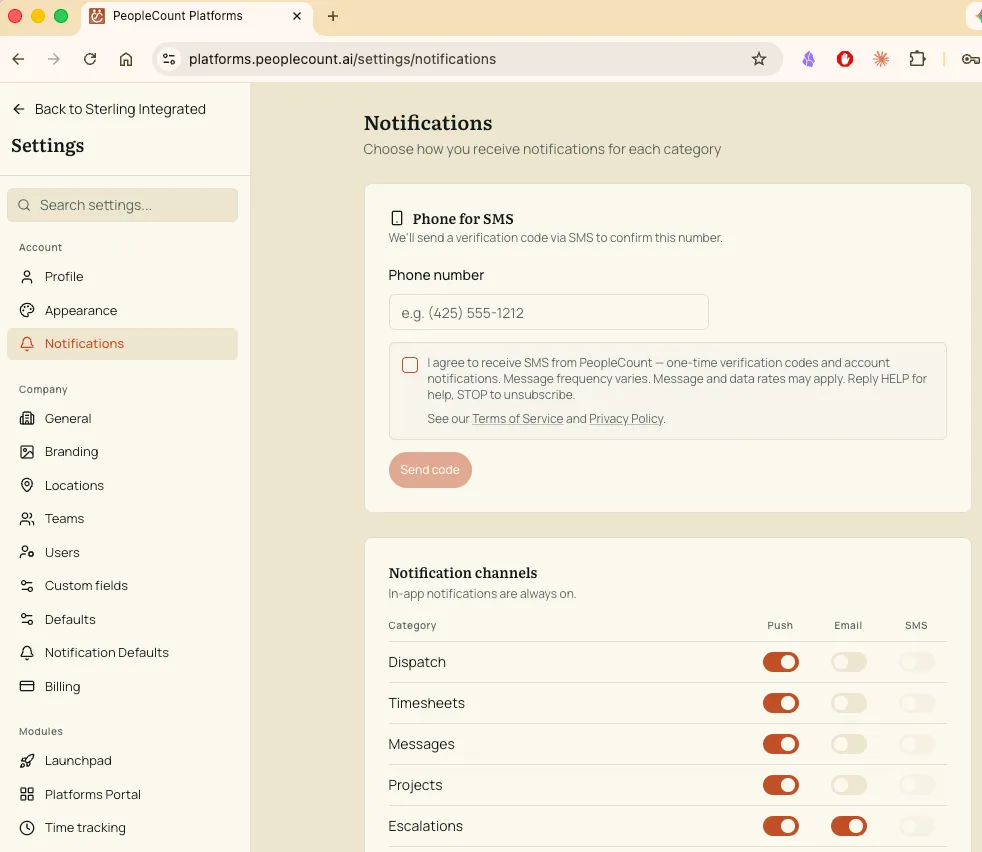
Mobile numbers are added only by the account holder, from inside the PeopleCount web application at platforms.peoplecount.ai/settings/notifications.
To opt in, a signed-in user:
- Enters their own mobile number in the Phone for SMS card.
- Checks a consent checkbox stating: “I agree to receive SMS from PeopleCount — one-time verification codes and account notifications. Message frequency varies. Message and data rates may apply. Reply HELP for help, STOP to unsubscribe.”
- Receives a 6-digit verification code by SMS and enters it back into the app to confirm the number is theirs.
The Send code button is disabled until the consent box is checked, so opt-in is always affirmative.
PeopleCount does not purchase, import, or share mobile numbers. Every number on our SMS list was entered and verified by its owner from inside their account.
Message frequency
Frequency varies based on account activity. Most account holders receive fewer than 10 messages per month.
Costs
Message and data rates may apply, depending on your mobile carrier and plan.
Getting help and opting out
- HELP keywords: HELP, INFO, SUPPORT — replies with our support contact.
- STOP keywords: STOP, STOPALL, UNSUBSCRIBE, CANCEL, END, QUIT, OPTOUT, REVOKE — unsubscribes you from further messages on this number.
- To re-subscribe after opting out, reply START.
For other questions, email support@peoplecount.ai.